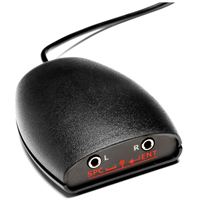
The SimplyWorks Switcher-4 control interface links with SimplyWorks Wireless Switches to provide wireless switch control for up to 4 devices. The included 60" cables provide connection between the Switcher-4 interface and the devices. The compact con ...
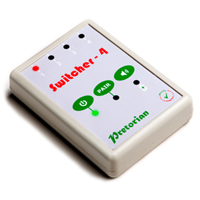
The SimplyWorks Switcher-4 control interface links with SimplyWorks Wireless Switches to provide wireless switch control for up to 4 devices. The included 60" cables provide connection between the Switcher-4 interface and the devices. The compact control module reduces the number of switches required for device control, freeing up space on lap-trays or wheelchairs.
Two modes of usage are available - Single-Switch or Two-Switch. In Single-Switch mode the Switcher-4 can support control of up to 4 single-switch devices using only two SimplyWorks Wireless Switches (available separately). One switch is assigned to select the active device while the second serves for device control. In Two-Switch Mode the Switcher-4 will support control of 2 devices but requires the use of 3 SimplyWorks Wireless Switches, with the first serving as the device selector and the other two buttons serving as input controls.* SimplyWorks is the world's first fully integrated wireless system designed specifically for users with motor skill difficulties.
The Test-It Switch Tester from Pretorian provides a quick and easy way to test your switches before beginning work with them. This is particularly timesaving when working with multiple switches, switch interfaces, computer equipment and users. ...
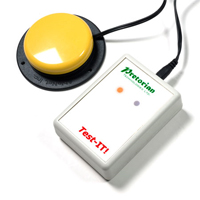
The Test-It Switch Tester from Pretorian provides a quick and easy way to test your switches before beginning work with them. This is particularly timesaving when working with multiple switches, switch interfaces, computer equipment and users.
The n-ABLER Trackball from Pretorian is specifically designed to address the needs of computer users with limited hand control, motor skill difficulties, poor hand-eye coordination, and lack of manual dexterity. This functionality is packaged in a he ...
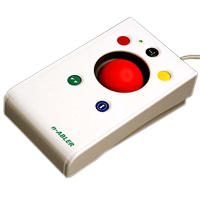
The n-ABLER Trackball from Pretorian is specifically designed to address the needs of computer users with limited hand control, motor skill difficulties, poor hand-eye coordination, and lack of manual dexterity. This functionality is packaged in a heavy duty housing designed to survive heavy use. High contrast coloured buttons and trackball assist users in determining position and function of the controls.
The n-ABLER Trackball provides cursor control as well as single-click controls for left click, right click, double click, and drag lock functions. In addition the n-Abler Trackball also offers a "Locking Axis" function which locks the cursor to either vertical or horizontal movement, addressing the difficulty of cursor control for users who experience tremors or may struggle with fine motor control.
Cursor control on the n-ABLER Trackball is provided by a large 63 mm, free-running ball which responds to minimal effort. To avoid accidental movement the trackball projects only slightly above the housing, with the activation buttons fully recessed to avoid accidental activation as well as to aid users in button targeting. Dual mini-phono jacks also permit the attachment of a variety of external switches to provide users with easier access to the Left and Right click functions. Users who find the traditional orientation unsuitable have the option of 'teaching' the trackball to orient itself at 90° increments, freeing the user to change the housing orientation for optimum usage and comfort. The trackball also offers an optional buzzer setting which provides notification as specific functions are activated or deactivated.
The design of the n-ABLER Trackball offers fingertip precision control and requires only minimal hand movement. This can reduce wrist and elbow fatigue, as it requires noticeably less effort. The symmetrical design enables users to work with either hand without having to angle the wrist, and the unit can also be configured for 'left-handed' operation. Its large, integrated hand support/palm rest makes work posture more relaxed and less strained.
Note: The release of iOS13 for Apple portable devices included support for USB Pointing Devices. This means that virtually all of the Pretorian Mouse Replacement solutions can now be used with iPads and iPhones that have iOS13 or newer. Connection to the portable device requires a camera adapter cable. Because the mousing device will be powered by the phone or tablet it is preferable to use one with pass-through charging so the portable device can charge while the mousing device is attached and in use.
Models
Model #
Description
Price
In Stock?
Buy Now
NAT
n-ABLER Trackball, USB with PS/2 adapter, Off-white Housing with High Contrast Colour Controls
The Optima Trackball from Pretorian is a durable desktop trackball designed with the requirements of users with limited motor skills in mind, yet totally suitable for use by a wide range of users. The angled housing provides an ergonomically supporti ...
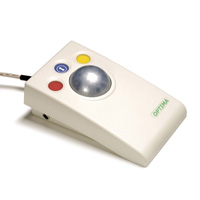
The Optima Trackball from Pretorian is a durable desktop trackball designed with the requirements of users with limited motor skills in mind, yet totally suitable for use by a wide range of users. The angled housing provides an ergonomically supportive position for the hand by providing a place to rest during use.
The large 2" diameter trackball rises 0.7" above the trackball housing, presenting a significant profile for the hand to make contact with. The free-running trackball is securely mounted in the housing and offers smooth movement from even a light touch. Tracking is provided by an optical sensor which eliminates mechanical parts which can fail from wear while still offering precise tracking and cursor control.
Colour-coded and recessed control buttons for Left Click, Right Click, and Drag-Lock are positioned above the trackball. The recessed location assists users in guiding their fingers to the appropriate buttons as well as preventing accidental activation that could occur with flush or raised buttons. In addition, the Optima is also equipped with dual ports which accommodate the attachment of external switches for activation of the left and right click functions. These can be used to offer users with limited motor control alternative methods of clicking.
Note: The latest release of iOS13 for Apple portable devices includes support for USB Pointing Devices. This means that virtually all of the Pretorian Mouse Replacement solutions can now be used with iPads and iPhones that have iOS13 or newer. Connection to the portable device requires a "camera adapter cable". Because the mousing device will be powered by the phone or tablet it is preferable to use one with pass-through charging so the portable device can charge while the mousing device is attached and in use.
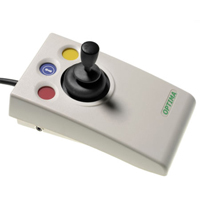
The Optima Joystick (with Gaming Features) from Pretorian is designed to address the computer access needs of individuals who may have limited hand control or strength, motor skill difficulties, poor hand-eye coordination, and lack of manual dexterit ...
The Optima Joystick (with Gaming Features) from Pretorian is designed to address the computer access needs of individuals who may have limited hand control or strength, motor skill difficulties, poor hand-eye coordination, and lack of manual dexterity. This functionality is packaged in a heavy duty housing designed to survive heavy use. High contrast coloured buttons and control surfaces aid in determining position and function of the controls.
The Optima Joystick requires just 0.5 Newtons of force for cursor control and has single-click controls for left click, right click, and drag lock functions. The joystick can be outfitted with the standard joystick, a T-Bar handle, or a soft-grip ball. Dual mini-phono jacks also permit the attachment of a variety of external switches to provide easier access to the Left and Right click functions.
The design of the Optima Joystick offers precision control and requires only minimal hand movement or force. The symmetrical design facilates operation with either hand without having to angle the wrist, and the unit can also be configured for left-handed operation. Its large, integrated hand support/palm rest makes work posture more relaxed and less strained.
NEW Feature: While originally intended as a computer access device the Optima Joystick can now be switched between standard computer mode and a new Gaming Mode for full compatibility with the Xbox Adaptive Controller.
Note: The latest release of iOS13 for Apple portable devices includes support for USB Pointing Devices. This means that virtually all of the Pretorian Mouse Replacement solutions can now be used with iPads and iPhones that have iOS13 or newer. Connection to the portable device requires a "camera adapter cable". Because the mousing device will be powered by the phone or tablet it is preferable to use one with pass-through charging so the portable device can charge while the mousing device is attached and in use.
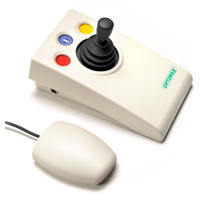
Built on the established platform of its wired Optima counterpart, the wireless OptimaX Joystick from Pretorian is designed to address the needs of those who may have limited hand control or strength, motor skill difficulties, poor hand-eye coordinat ...
Built on the established platform of its wired Optima counterpart, the wireless OptimaX Joystick from Pretorian is designed to address the needs of those who may have limited hand control or strength, motor skill difficulties, poor hand-eye coordination, and lack of manual dexterity. This functionality is packaged in a durable housing designed to survive heavy use. High contrast coloured buttons and control surfaces aid in determining position and function of the controls. The included compact USB Receiver offers an extended operating range in excess of 10 metres, making it ideal for use in multi-user settings and classrooms as it can be used as a desktop or handheld joystick.
The OptimaX Joystick requires just 0.5 Newtons of force for cursor control and has single-click controls for left click, right click, and drag lock functions. The joystick can be outfitted with the standard joystick, a T-Bar handle, or a soft-grip ball. Dual mini-phono jacks also permit the attachment of a variety of external switches to provide each individual with easier access to the Left and Right click functions.
The design of the OptimaX Joystick offers precision control and requires only minimal hand movement or force. The symmetrical design accommodates use by either hand without having to angle the wrist. Its large, integrated hand support/palm rest makes work posture more relaxed and less strained.
Robustly manufactured, the OptimaX is virtually maintenance free and will give years of untroubled service.
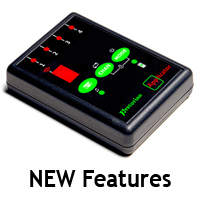
Pretorian Technologies' innovative APPlicator is a Wireless Switch Interface that can provide Scanning Switch Access to Switch Adapted Apps, Music and Photography from just a single switch (it does support the use of up to 4 switches). Bluetooth tech ...
Pretorian Technologies' innovative APPlicator is a Wireless Switch Interface that can provide Scanning Switch Access to Switch Adapted Apps, Music and Photography from just a single switch (it does support the use of up to 4 switches). Bluetooth technology links this device to the iPad, iPad mini, iPad Pro and iPhone, as well as other Bluetooth enabled tablet devices or computers such as Android and Surface Pro. Up to four switches can be connected and programmed to any of 24 functions via the convenient built-in display. An integrated button on the APPlicator deploys or hides the on-screen keyboard at any time with just a single touch.
There are a variety of features that provide for quick access to commonly desired functions. The Quick Media button provides instant preconfigured access to basic media function such as play/pause, skip forward, skip back and 10 second timed play, and with a switch set for "Volume Up" users can easily capture images or video with the Camera App.
New features now available (2018 Black models) include a new "Keypad Lock" that prevents inadvertent changes to settings, a programmable "single-shot" mode for users who find removing their hand from the switch difficult, and a manual power-off feature for use when the unit is being transported.
To see examples of switches which can be used with the APPlicator, check out our Switches category.
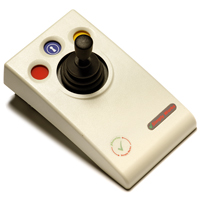
Built on the established platform of its wired Optima counterpart, the SimplyWorks Joystick from Pretorian is designed to address the needs of computer users who may have limited hand control or strength, motor skill difficulties, poor hand-eye coord ...
Built on the established platform of its wired Optima counterpart, the SimplyWorks Joystick from Pretorian is designed to address the needs of computer users who may have limited hand control or strength, motor skill difficulties, poor hand-eye coordination, and lack of manual dexterity. This functionality is packaged in a heavy duty housing designed to survive heavy use. High contrast coloured buttons and control surfaces assist users in determining position and function of the controls. The extended operating range in excess of 10 metres makes it ideal for use in multi-user settings and classrooms as it can be used as a desktop or handheld joystick.
The SimplyWorks Wireless functionality also means that this joystick can be combined with any combination of up to 5 other SimplyWorks equipped devices to communicate with a single computer through a SimplyWorks Wireless RECEIVE. This makes it an ideal solution for cooperative learning and interactive multi-user activities.
The SimplyWorks Joystick provides requires just 0.5 Newtons of force for cursor control and has single-click controls for left click, right click, and drag lock functions. The joystick can be outfitted with the standard joystick, a T-Bar handle, or a soft-grip ball. Dual mini-phono jacks also permit the attachment of a variety of external switches to provide users with easier access to the Left and Right click functions.
The design of the SimplyWorks Joystick offers precision control and requires only minimal hand movement or force. The symmetrical design enables users to work with either hand without having to angle the wrist, and the unit can also be configured for "left-handed" operation. Its large, integrated hand support/palm rest makes work posture more relaxed and less strained.
Robustly manufactured, the SimplyWorks Wireless Joysticks is maintenance free (with the exception of battery replacement) and will give years of untroubled service.
Note: The latest release of iOS13 for Apple portable devices includes support for USB Pointing Devices. This means that virtually all of the Pretorian Mouse Replacement solutions can now be used with iPads and iPhones that have iOS13 or newer. Connection to the portable device requires a "camera adapter cable". Because the mousing device will be powered by the phone or tablet it is preferable to use one with pass-through charging so the portable device can charge while the mousing device is attached and in use. In the case of the SimplyWorks solutions, the Receive:2 is still required to support the pointing device connection. The Receive:2 plugs into the camera adapter cable and provides the wireless connection to the pointing device.
The Simple Switch Interface from Pretorian is a simple and convenient way to connect up to two switches to a computer to access most assistive technology software packages. Two different preset modes enables users to select from either Right/Left Mou ...
The Simple Switch Interface from Pretorian is a simple and convenient way to connect up to two switches to a computer to access most assistive technology software packages. Two different preset modes enables users to select from either Right/Left Mouse clicks or Space/Enter functions. A front indicator light identifies the current operating mode. Mode settings are retained even when powered down.
To see examples of switches which can be used with the Simple Switch Interface, check out our Switches category.
The Clevy SimplyWorks Wireless Keyboard from Pretorian combines the superior quality and durability of the Clevy Keyboard with the innovative SimplyWorks Wireless Interface from Pretorian. This keyboard features large 0.75" keycaps (30% larger than s ...
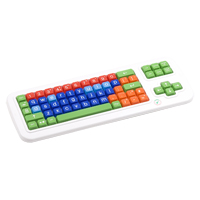
The Clevy SimplyWorks Wireless Keyboard from Pretorian combines the superior quality and durability of the Clevy Keyboard with the innovative SimplyWorks Wireless Interface from Pretorian. This keyboard features large 0.75" keycaps (30% larger than standard) with large bold white legends for ease of identification. The brightly coloured keycaps are colour-coded for easy identification of vowels, consonants, numbers, punctuation, and control keys making this keyboard ideal for the learning environment. Keys are arranged in an orthogonal grid which makes it easier for users to find and reach the keys. A switch on the underside can be employed to turn off Key Repeat for users who may rest their hands and fingers on the keys. This switch also offers access to the "Function Key" feature should that be required. A rigid keyboard overlay accessory is available to provide assistance for users with temporary or permanent motor skills difficulty.
To ensure the durability of the Clevy Keyboard it is built with an internal steel frame and is equipped with high-quality mechanical keyswitches rated for 50 million activations. In order to address the potential for spilled fluids the housing is also designed to guide the fluid straight through the keyboard, protecting the internal electronics.
The SimplyWorks Wireless functionality means that this keyboard can be combined with any combination of up to 5 other SimplyWorks equipped devices (Keyboards, Trackballs, Joysticks) to communicate with a single computer through a SimplyWorks Wireless RECEIVE. This capability and the 10 metre transmission range makes it an ideal solution for cooperative learning and interactive multi-user activities.